


 Previous
When printing multiple documents such as handouts for meetings, you can separate sets into order. Collate stores data transmitted from a computer to the machine's memory or hard disk drive.
When using the PCL 6 printer driver, Collate can be specified in the [Finishing] menu on the [Detailed Settings] tab. When using the PCL 5c/5e printer driver, it can be specified in the [Setup] tab. For printing methods, see the printer driver Help.

You can sort up to 1,000 pages, and up to 999 copies.
If form feed is executed by [Auto Continue] for a print job whose processing is disrupted by errors, Collate will be canceled. For details about [Auto Continue], see Executing Form Feed when Print Settings Do Not Match
 .
.
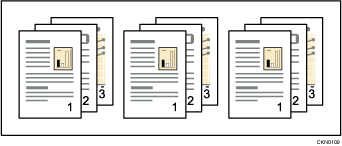
Collate
Printed output is assembled as sets in sequential order.

When Collate or rotation is specified in the printer driver, make sure [Application Collate] is not selected. The output may not come out as desired. Specify [Printer Collate] when printing the document.
The paper size and number of sheets supported by Collate function differ depending on the attached option. For details, see "Specifications", Maintenance and Specifications.


